
Introduction
A company website is often treated as a simple application: build the frontend, put the files somewhere, connect a domain, and make it available on the internet.
But when the requirement changes from simply "host the website" to:
"Make the website fast for users, secure the origin, protect it from malicious traffic, and make deployments automated and repeatable."
the architecture becomes more interesting.
That was the problem we wanted to solve.
The company needed a website that could serve users efficiently without relying on a traditional always-running web server for static content. At the same time, the application needed a custom domain, HTTPS, protection against malicious web requests, and a deployment process that did not depend on manually uploading files whenever a developer pushed a new version.
The challenge was therefore not just hosting a website.
It was designing a complete delivery pipeline around it.
The architecture we implemented used:
Amazon S3 for static website content storage.
Amazon CloudFront as the global content delivery layer.
Amazon Route 53 for DNS management.
AWS WAF for web request protection.
AWS Certificate Manager for HTTPS certificates.
GitHub Actions for automated deployment.
The result was an architecture in which storage, delivery, security, DNS, and deployment were separated into dedicated components.
This article explains why we chose this architecture, how the components work together, the problems we encountered, and what we learned from implementing it.
1. The Problem: Hosting a Website Is Easy. Hosting It Properly Is Different.
The first question was simple:
Where should the website run?
The most obvious answer would have been to launch an EC2 instance, install Nginx, copy the frontend files, and expose the server to the internet.
That architecture would look something like this:
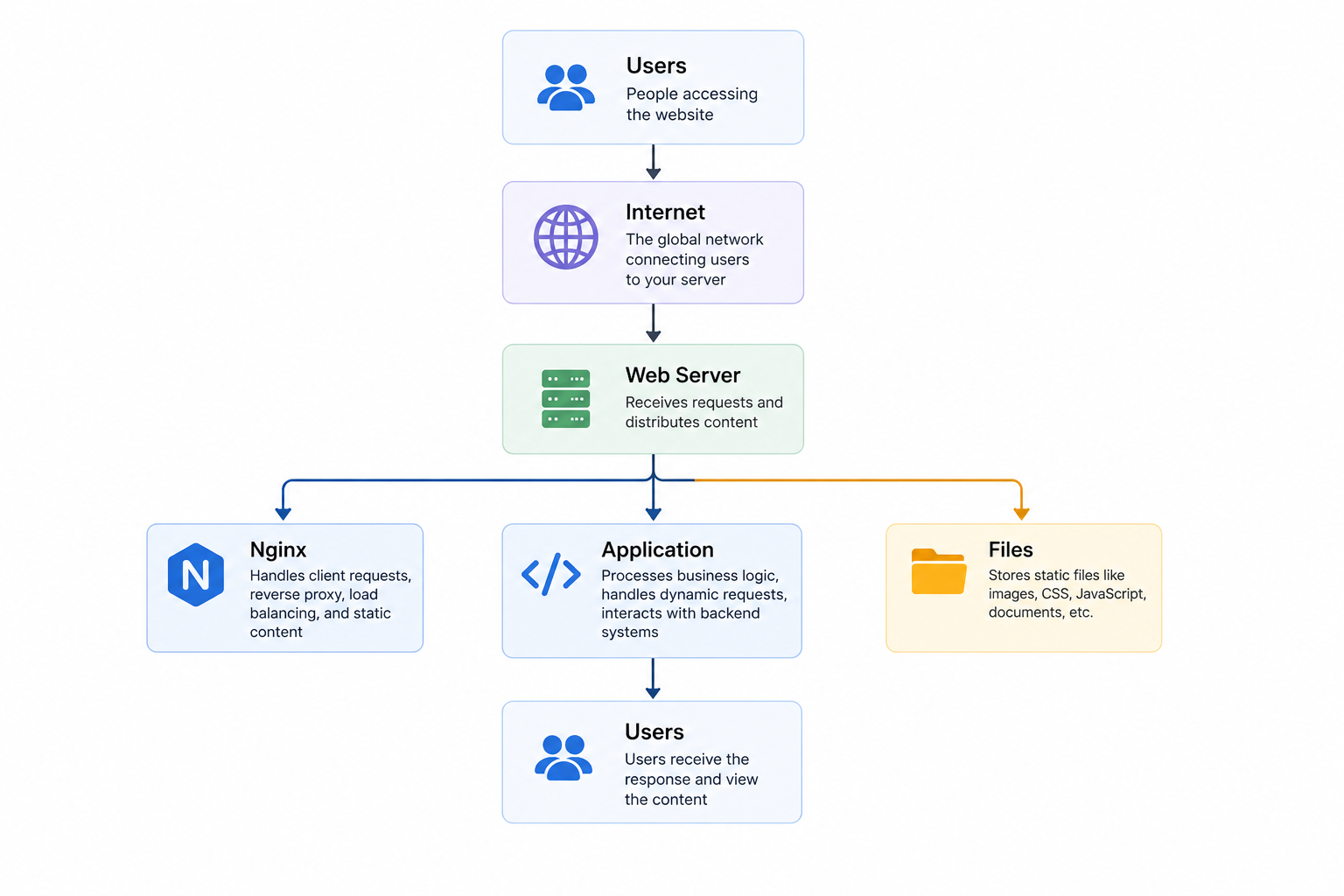
User --> Internet --> EC Instance --> Nginx --> Website Files
This works.
But it also means that we now have to think about the server itself.
1. Who manages operating system updates?
2. What happens when traffic increases?
3. How do we handle server availability?
4. How do we protect the server?
5. How do we distribute content to users who are geographically far from the server?
6. How do we deploy a new version?
7. How do we make sure the deployment process is repeatable?
For a website that primarily consists of static frontend assets, maintaining a dedicated web server for the sole purpose of serving files adds an operational layer that may not be necessary.
So we changed the question.
Instead of asking:
"Which server should host the website?"
we asked:
"Do we actually need to manage a server to host this website?"
This led us to a serverless static hosting architecture using Amazon S3 and Amazon CloudFront.
2. The Architectural Decision: Separate Storage from Delivery
The core design decision was to separate two responsibilities.
Amazon S3 stores the website.
Amazon CloudFront delivers the website.
This distinction is important.
S3 is excellent at storing static objects, but it is not designed to be the global delivery layer for a modern website.
CloudFront, on the other hand, is designed to deliver content through edge locations and cache frequently requested objects.
The resulting architecture became:
                    ┌──────────────────┐
                    │   Amazon S3      │
                    │                  │
                    │ Static Website   │
                    │ Content / Origin │
                    └────────▲─────────┘
                             │
                             │ Origin
                             │
                    ┌────────┴─────────┐
                    │  Amazon CloudFront│
                    │                  │
                    │ Global Delivery  │
                    │ Caching          │
                    └────────▲─────────┘
                             │
                             │
                           Users
This immediately solved one of the biggest requirements.
We no longer needed to run a web server simply to serve static files.
But this created another architectural question:
If CloudFront is the public entry point, how do we protect the S3 origin?
That became the next important design decision.
3. Protecting the Origin Instead of Exposing It
One of the mistakes that can happen with a basic S3 + CloudFront setup is to make the S3 bucket publicly accessible.
That technically works.
But it creates a problem.
If users can directly access the S3 origin, they can potentially bypass the CloudFront distribution entirely.
The whole purpose of putting CloudFront in front of the origin is weakened.
Instead, we wanted the request path to look like this:
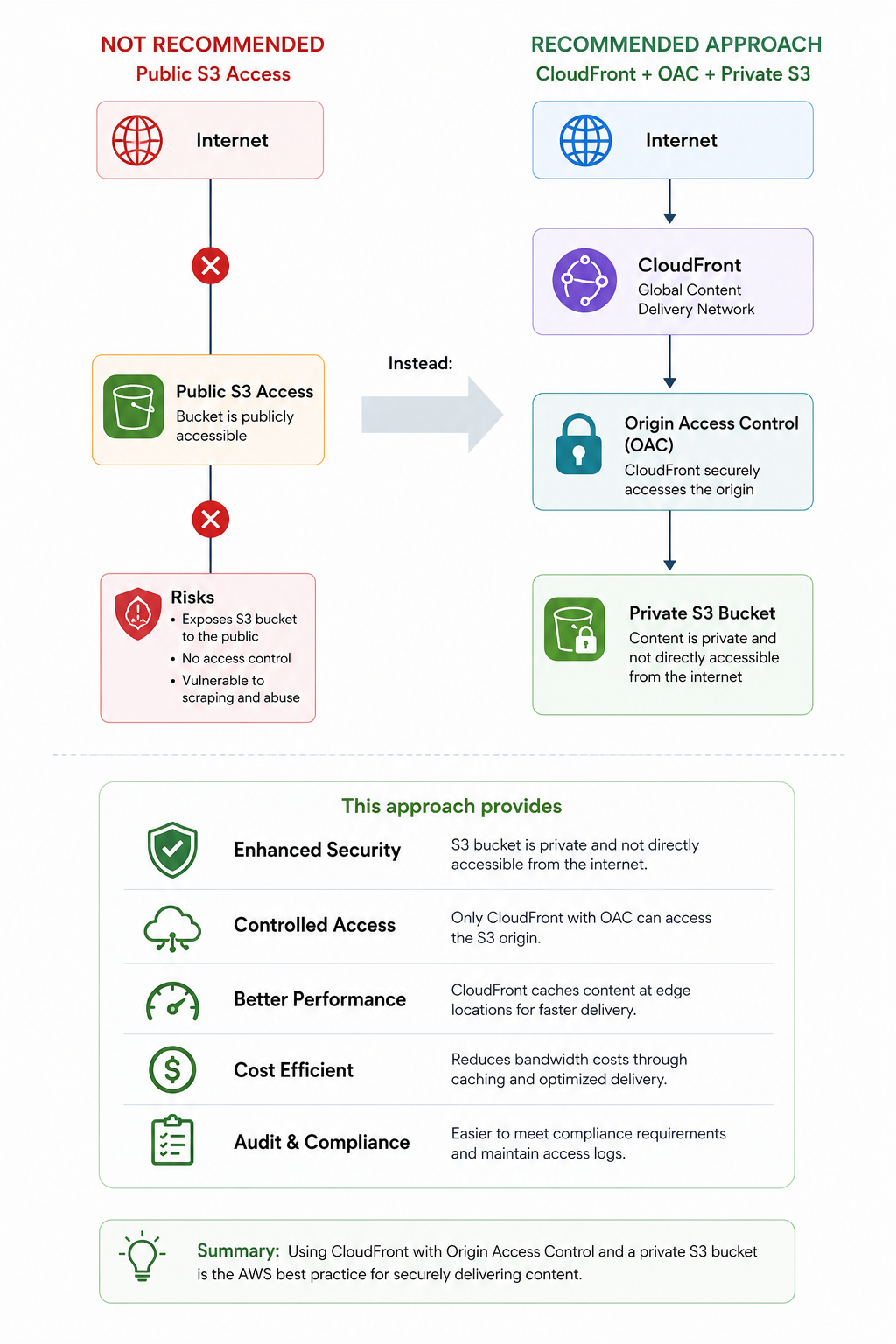
The S3 bucket acts as the origin, but the public internet does not directly access it.
This creates a much cleaner architecture.
The public-facing layer is CloudFront.
The storage layer is S3.
The origin remains protected behind the delivery layer.
This is one of the most important architectural decisions in the entire implementation.
4. The Global Delivery Problem
The next problem was performance.
Imagine the website is hosted in one AWS Region, while users are distributed across different geographic locations.
Without a CDN, requests must travel to the origin.
Conceptually:
User A ───────────────┐
                      │
User B ───────────────┼──────> S3 Origin
                      │
User C ───────────────┘
Every request that reaches the origin has to travel back and forth.
CloudFront changes the model.
The first request may need to reach the origin:
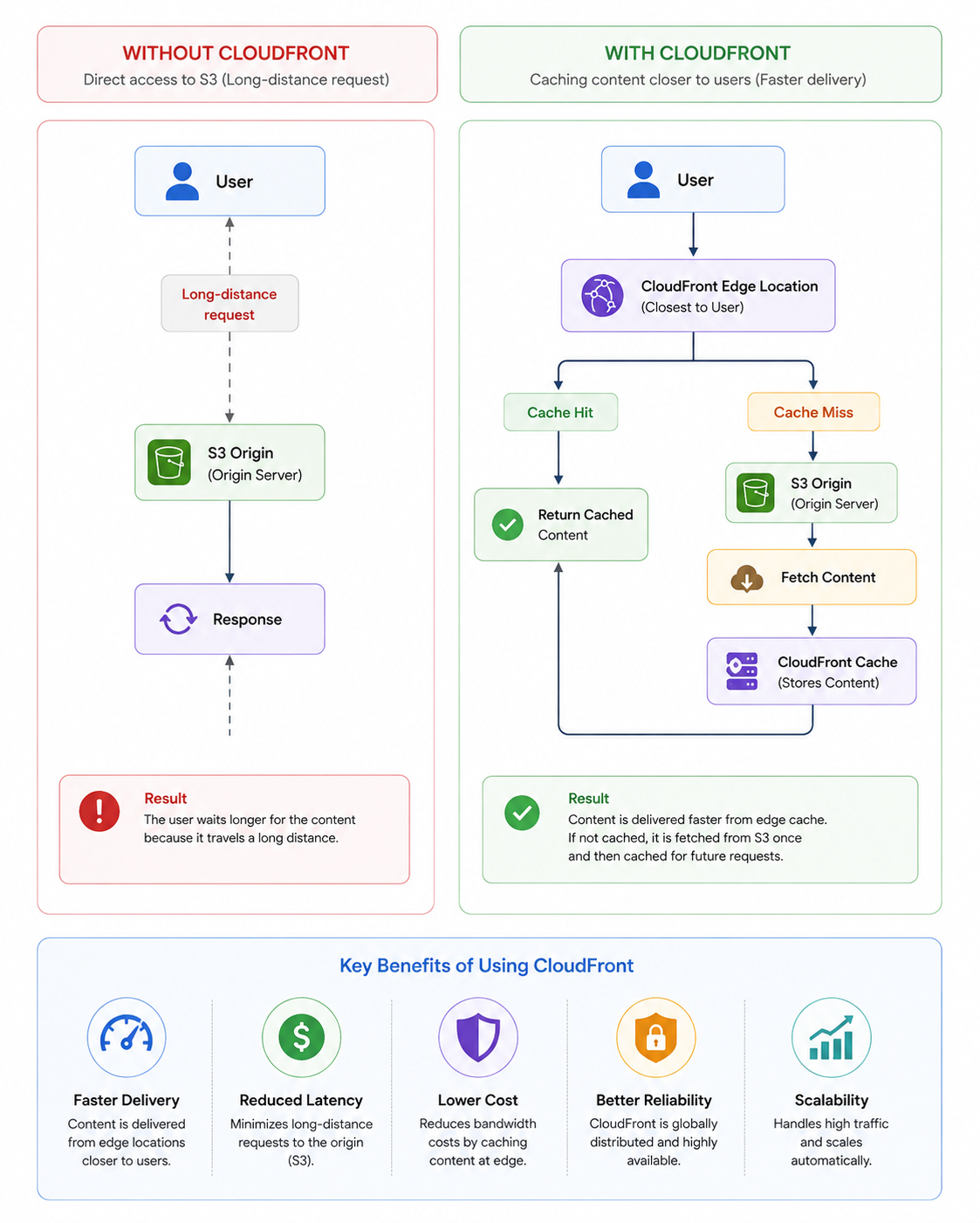
A subsequent request may be served directly from the edge
This is the fundamental reason CloudFront was introduced.
The goal was not simply to "use a CDN."
The goal was to move frequently requested content closer to users while reducing repeated requests to the origin.
This architecture also creates a useful separation:
S3 is responsible for durable content storage.
CloudFront is responsible for content delivery and caching.
5. Connecting the Custom Domain
The next requirement was the company's custom domain.
Users should not have to access a CloudFront distribution through an AWS-generated domain.
They should be able to use the company's own domain.
This introduced Amazon Route 53 into the architecture.
The request flow became:
User
 |
 | https://company-domain.com
 v
Route 53
 |
 | DNS Resolution
 v
CloudFront
 |
 v
S3
Route 53 is responsible for answering the DNS question:
"Where should this domain point?"
CloudFront is responsible for answering the next question:
"How should the content be delivered?"
S3 then answers:
"Where is the actual website content stored?"
Each service therefore has a clear responsibility.
This separation made the architecture easier to manage and troubleshoot.
6. Adding HTTPS
A production website should not rely on unencrypted HTTP traffic.
The architecture therefore included HTTPS.
The request path became:
User
 |
 | HTTPS
 v
Custom Domain
 |
 v
CloudFront
 |
 v
S3
AWS Certificate Manager was used to manage the TLS certificate required for the custom domain.
One implementation detail that is easy to overlook is that CloudFront has specific requirements regarding where the ACM certificate must be provisioned.
This was an important lesson during implementation:
AWS services may have regional requirements even when the service itself operates globally.
Understanding these service-specific constraints early prevents unnecessary troubleshooting later.
7. The Security Problem: The Website Is Public
At this point, the architecture was functional.
But there was another question.
The website is publicly accessible.
That means anyone on the internet can send requests to it.
Not all requests are legitimate.
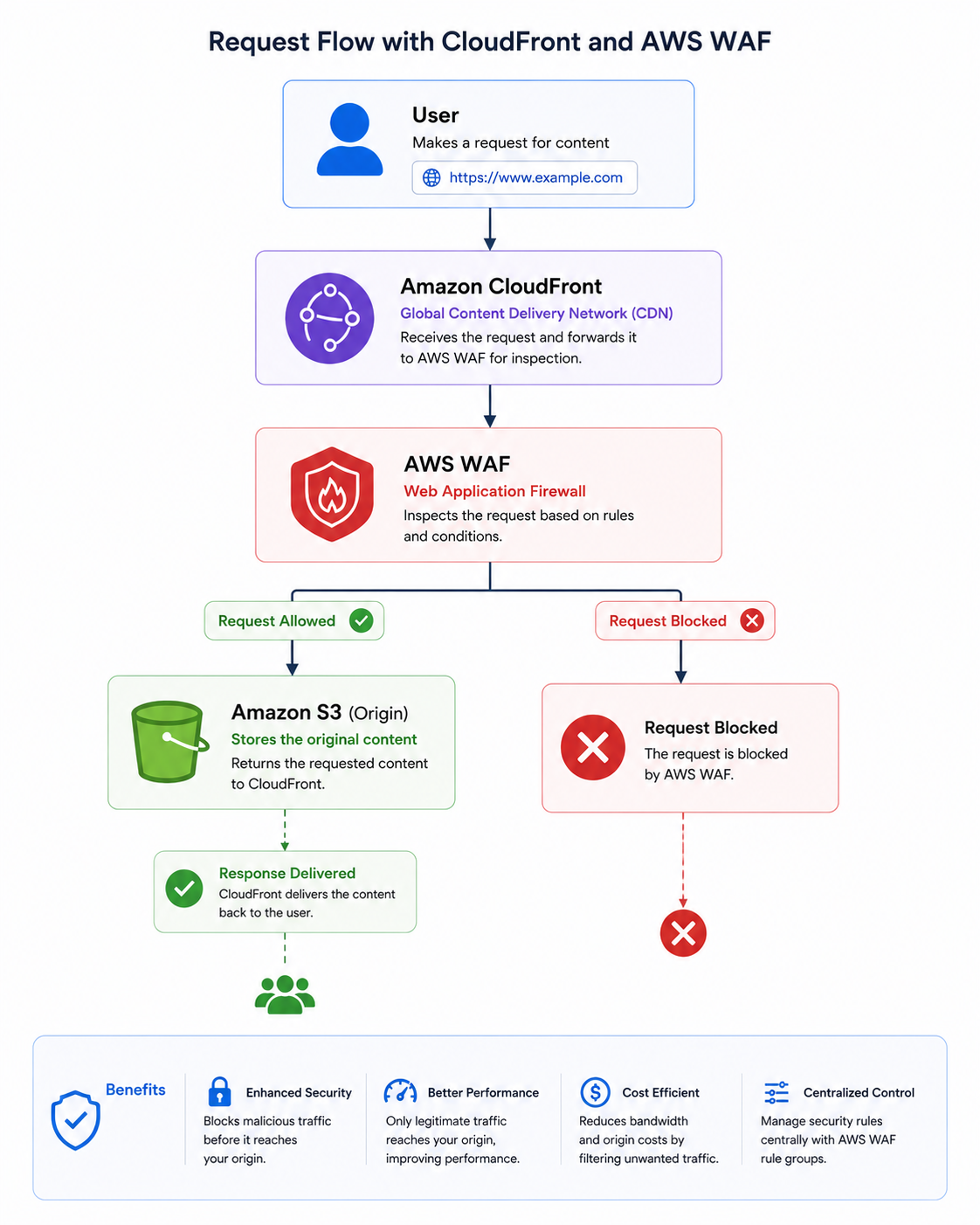
We therefore needed an additional layer that could inspect incoming web requests and apply security rules before traffic reached the origin.
This introduced AWS WAF.
The architecture became:
User
 |
 v
CloudFront
 |
 v
AWS WAF
 |
 ├── Allowed Request
 |       |
 |       v
 |      S3
 |
 └── Blocked Request
         |
         X
The important point is that WAF is positioned as part of the request path.
Instead of allowing every request to reach the origin, requests can be evaluated first.
Depending on the requirements, the WAF configuration can be extended with rules for:
Common web exploits.
SQL injection patterns.
Cross-site scripting patterns.
IP-based filtering.
Rate-based rules.
Custom application-specific restrictions.
The security architecture therefore became layered:
                Internet
                   |
                   v
              CloudFront
                   |
                   v
                AWS WAF
                   |
                   v
           Private S3 Origin
This is an example of defense in depth.
No single AWS service is expected to solve every security problem.
Instead, each layer has a specific responsibility.
8. The Deployment Problem
At this point, the website could be securely delivered.
But we still had a deployment problem.
A developer makes a change.
The code is pushed to GitHub.
What happens next?
A manual workflow might look like:
Developer
    |
    v
Build Locally
    |
    v
Create Production Files
    |
    v
Open AWS Console
    |
    v
Upload Files to S3
    |
    v
Update CloudFront
This works until the team starts deploying frequently.
Then problems begin to appear.
Someone forgets to upload a file.
Someone uploads the wrong build.
Someone forgets to invalidate cached content.
Someone deploys directly from a local machine.
The deployment process becomes dependent on individual people.
We wanted the deployment process to become predictable.
So we introduced GitHub Actions.
9. Automating the Deployment with GitHub Actions
The deployment workflow became:
Developer
    |
    | git push
    v
GitHub Repository
    |
    v
GitHub Actions
    |
    ├── Checkout Code
    |
    ├── Install Dependencies
    |
    ├── Build Application
    |
    ├── Run Validation
    |
    ├── Deploy to S3
    |
    └── Invalidate CloudFront Cache
             |
             v
        New Version Live
Now the deployment process was no longer tied to a developer's local environment.
The source repository became the starting point.
A code change triggered the pipeline.
The pipeline created the production build.
The build was uploaded to S3.
CloudFront was then updated so users could receive the latest version.
This changed the operational model from:
"Someone needs to deploy the website."
to:
"The system knows how to deploy the website."
That distinction is the real value of CI/CD.
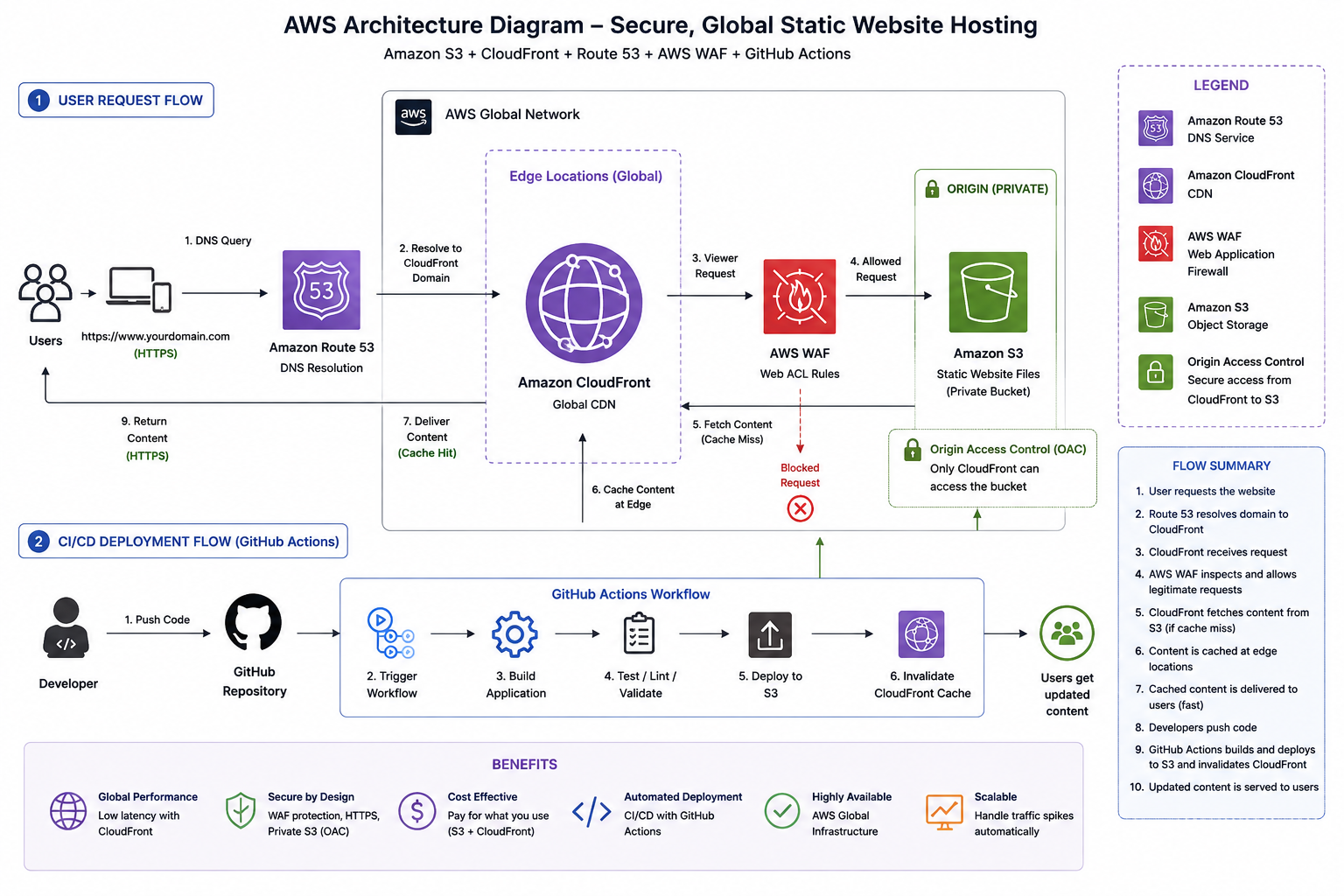
10. Understanding the Complete Architecture
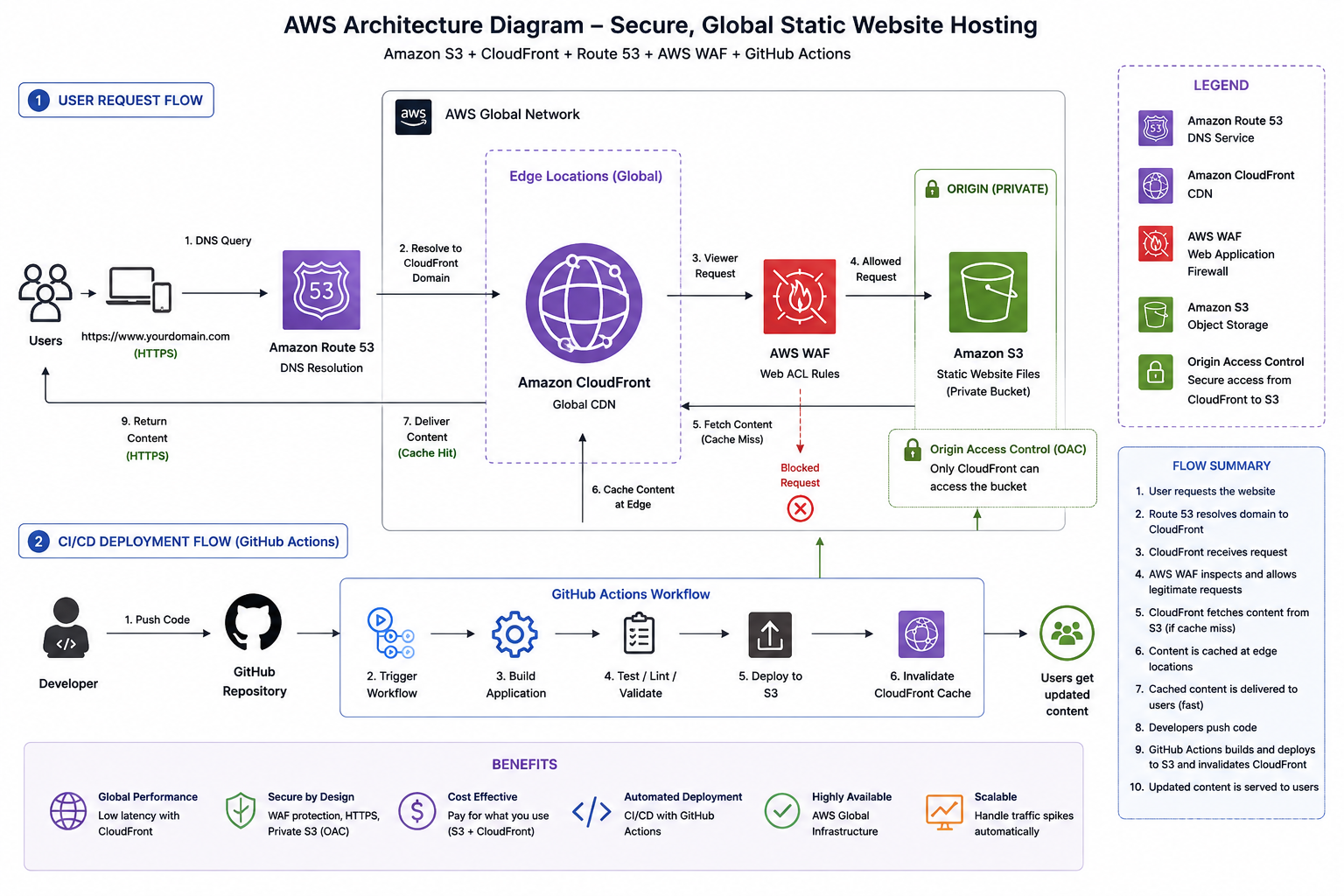
The final architecture has two distinct flows.
Keeping these two flows separate helped us reason about the architecture.
The first flow answers:
"How does a user receive the website?"
The second answers:
"How does a new version of the website reach users?"
11. The Result
The final solution provided a clear separation of responsibilities.
The architecture removed the need to maintain a traditional web server purely for serving static website assets.
More importantly, the system became easier to reason about.
When there is a DNS issue, we know where to look.
When there is a caching issue, we know where to look.
When there is a security issue, we know where to look.
When there is a deployment issue, we know where to look.
This separation of concerns is one of the most valuable aspects of the architecture.
12. The Most Important Lessons
1. Start with the problem, not the AWS service
We did not begin with:
"Let's use CloudFront."
We began with:
"We need to deliver website content efficiently to users in different locations."
The service was selected because it solved the problem.
2. A CDN is not just about performance
CloudFront improved content delivery, but it also became an important architectural boundary between users and the origin.
That allowed us to build a stronger origin protection model.
3. Security should be part of the architecture
WAF was not added as an afterthought.
The public request path was designed with security in mind:
4. CI/CD is more than automation
GitHub Actions did not just save time.
It made deployments repeatable.
That reduces the dependency on manual processes and individual developer environments.
5. Managed services reduce operational overhead
For a static website, using S3 and CloudFront allowed us to avoid managing a dedicated web server for static content.
The architecture focuses engineering effort on the application rather than server maintenance.
13. What We Would Improve Next
The architecture is functional, but cloud architecture is an iterative process.
The next improvements we would consider include:
GitHub Actions OIDC
Instead of using long-lived AWS access keys, GitHub Actions can authenticate to AWS using OIDC and assume a dedicated IAM role.
This provides short-lived credentials and improves the security posture of the deployment pipeline.
Infrastructure as Code
The architecture can be managed using AWS CDK, Terraform, or CloudFormation.
That would allow the infrastructure itself to be version-controlled and reproducible.
Multi-Environment Deployment
The next evolution could introduce:
GitHub --> Development --> Staging --> Productionwith controlled promotion between environments.
Automated Security Checks
The CI/CD pipeline can also evolve to include:
Dependency scanning.
Secret detection.
Static analysis.
Infrastructure-as-Code scanning.
This would move the architecture toward a complete DevSecOps workflow.
Observability
Monitoring and logging could be expanded across CloudFront, WAF, S3, and the deployment pipeline to provide better visibility into application performance and security events.
Conclusion
The final architecture was not about putting a website on AWS.
It was about solving a series of connected problems.
1. How do we store the content?
Amazon S3.
2. How do we deliver it efficiently?
Amazon CloudFront.
3. How do users find it?
Amazon Route 53.
4. How do we protect the public request path?
AWS WAF.
5. How do we secure communication?
HTTPS through ACM and CloudFront.
6. How do we deploy changes consistently?
GitHub Actions.
The result is a simple but powerful architectural principle:
Store centrally, deliver globally, protect at the edge, and automate the deployment.
The biggest lesson from this project was that good cloud architecture is not about using the maximum number of services.
It is about understanding the problem, identifying the operational requirements, and choosing the right managed services to solve those requirements with the least unnecessary complexity.
This architecture provides a foundation that can evolve further into Infrastructure as Code, OIDC-based deployments, multi-environment promotion, automated security scanning, and centralized observability.
And that is where the real value of cloud architecture becomes visible not in the individual AWS services, but in how they work together to solve a real-world problem.