
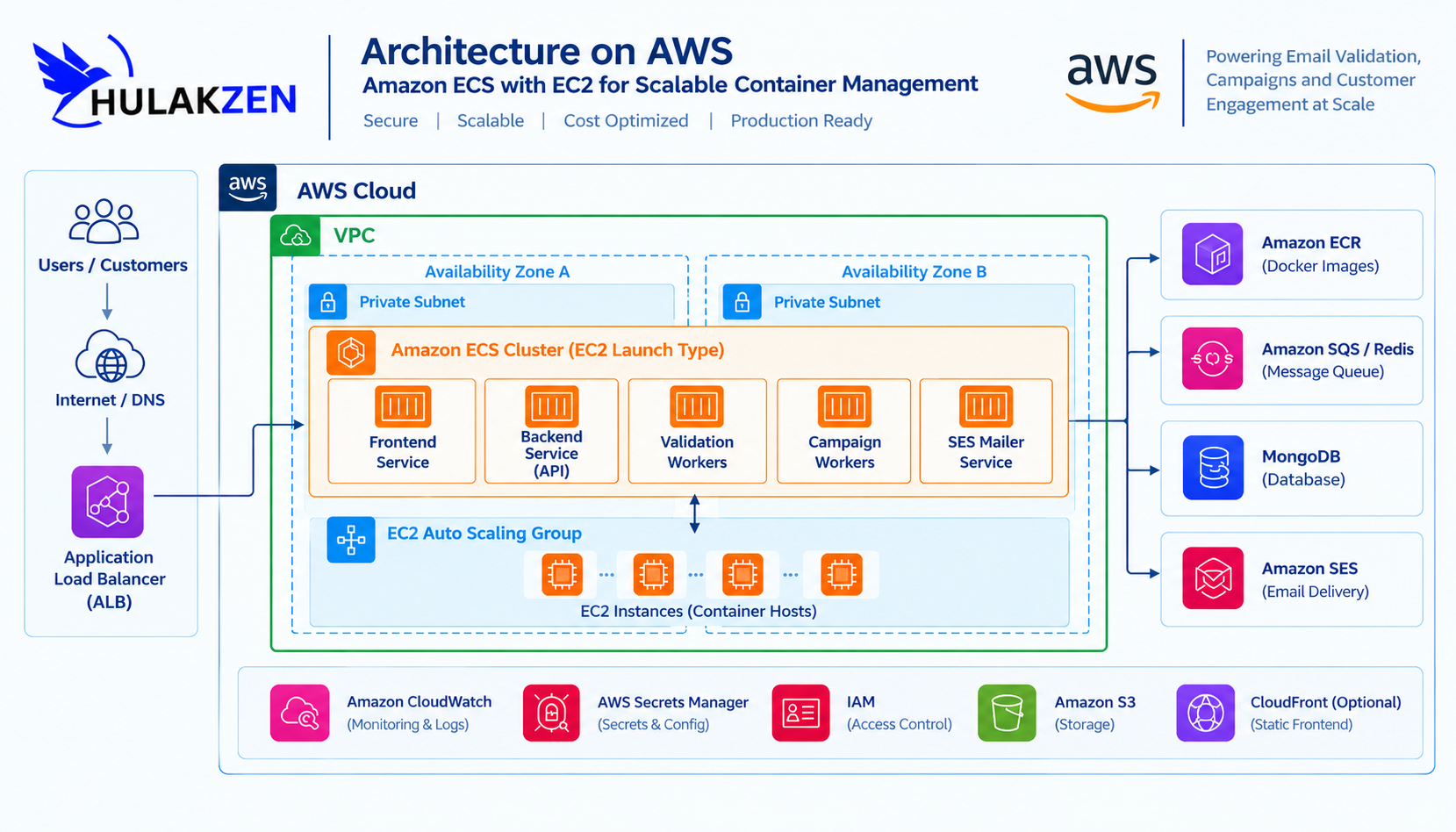
Introduction
As HulakZen evolves into an email validation and multichannel marketing platform, its infrastructure needs to support reliable deployments, background processing, horizontal scaling, and secure communication between services.
HulakZen includes services for frontend delivery, backend APIs, email validation, campaign processing, and integrations with Amazon Simple Email Service (Amazon SES). These workloads can be packaged as Docker containers and orchestrated using Amazon Elastic Container Service (Amazon ECS).
This article explores how Amazon ECS with the EC2 launch type can provide a flexible foundation for running HulakZen's containerized workloads on AWS.
Architecture status: This article presents a proposed architecture and practical implementation approach. The examples do not imply that the complete architecture described here has already been deployed in HulakZen's production environment.
1. Why Amazon ECS with EC2?
Amazon ECS is a fully managed container orchestration service that helps deploy, manage, and scale containerized applications.
With the EC2 launch type, ECS schedules containers onto Amazon EC2 instances that you manage as container capacity. AWS manages the ECS control plane, while you remain responsible for the underlying EC2 capacity, operating system maintenance, and related infrastructure.
For HulakZen, this approach offers several advantages:
Control over compute resources: Select EC2 instance types based on API, validation, and worker workloads.
Container orchestration: Manage multiple Docker services through ECS task definitions and services.
Horizontal scaling: Increase the number of application tasks as demand grows.
Flexible background processing: Run email validation and campaign workers separately from the API.
AWS integration: Integrate with Amazon ECR, Application Load Balancer, CloudWatch, IAM, and Amazon SES.
Cost management: Choose instance families and capacity strategies that fit workload requirements.
Amazon ECS with EC2 is particularly useful when workloads require more control over compute capacity or when running a combination of long-running API services and background workers.
2. Proposed HulakZen Architecture
The following diagram illustrates a possible production architecture for HulakZen using ECS on EC2.
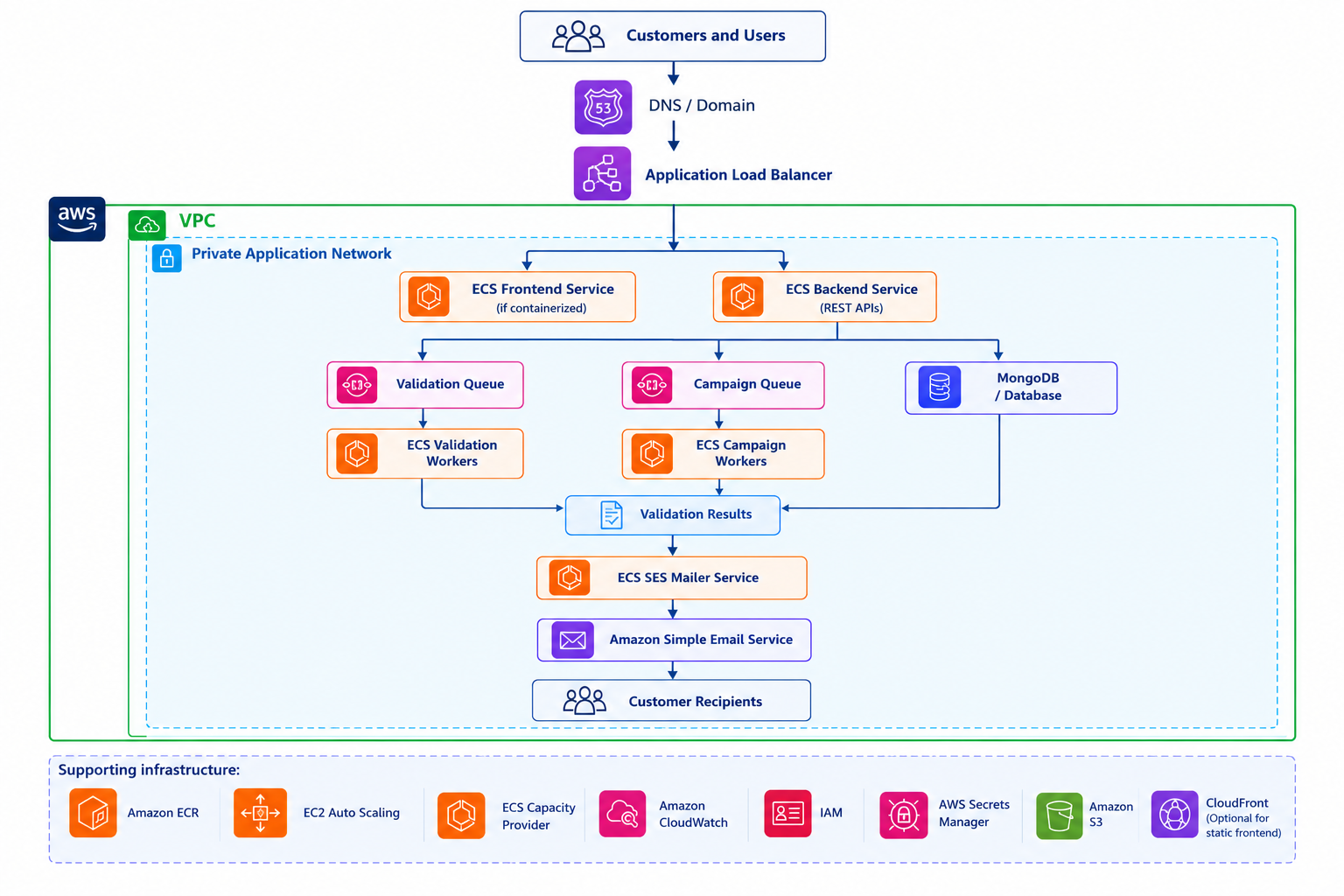
The frontend and backend API can run as ECS services. Validation and campaign processing can run as separate services or workers, depending on how their jobs are scheduled and consumed.
The Application Load Balancer routes incoming HTTP or HTTPS requests to registered application targets. Background workers normally do not need public load-balancer access.
The exact design should be adjusted to the application's current networking, database, queue, and deployment requirements.
3. AWS Components Used in the Architecture
| AWS service or component | Purpose |
|---|---|
| Amazon ECS | Schedules and manages containerized workloads |
| Amazon EC2 | Provides compute capacity for ECS tasks |
| Amazon ECR | Stores versioned Docker container images |
| Application Load Balancer | Distributes incoming HTTP/HTTPS traffic |
| EC2 Auto Scaling Group | Adds or removes EC2 container instances |
| ECS Capacity Provider | Connects ECS capacity needs to EC2 Auto Scaling |
| Amazon CloudWatch | Collects logs, metrics, and alarms |
| AWS IAM | Controls permissions for tasks and infrastructure |
| Amazon SES | Sends application and campaign emails |
| Redis / BullMQ | Supports queued background jobs when configured |
| MongoDB | Stores application data, according to the selected deployment model |
Redis and MongoDB are not automatically provided by ECS. They must be deployed or connected to separately, with appropriate security, backups, monitoring, and availability configuration.
4. Containerizing HulakZen Services
Before deploying an application to ECS, each service needs a container image.
A typical HulakZen deployment may include separate images for:
Frontend
Backend API
Email validation worker
SES or campaign mailer
Each service should have its own Dockerfile or an appropriately configured shared build process. Separate images make it easier to deploy, scale, and troubleshoot services independently.
Example Dockerfile
The following is an illustrative Dockerfile for a Node.js service. Adjust the build steps, application entry point, and dependencies to match the actual HulakZen service.
Code / CommandFROM node:22-alpine

WORKDIR /app

COPY package*.json ./

RUN npm ci --omit=dev

COPY . .

ENV NODE_ENV=production
ENV PORT=3000

EXPOSE 3000

CMD ["npm", "start"]
For a production application, use a suitable supported Node.js version, pin dependencies, run the application as a non-root user where practical, and avoid copying secrets into the image.
.dockerignore: The following files and directories are excluded from the Docker build context.
node_modules
.git
.env
.env.*
coverage
npm-debug.log
Do not copy production credentials, API keys, or database passwords into Docker images.
5. Build and Push Images to Amazon ECR
Amazon Elastic Container Registry stores the images that ECS tasks will use.
Create an ECR repository for each service or use a repository strategy appropriate for your release process.
Example repository names:
hulakzen-frontend
hulakzen-backend
hulakzen-validation-worker
hulakzen-ses-mailer
Authenticate Docker to ECR
Set the correct AWS Region and account ID before running the commands.
Code / Commandaws sts get-caller-identity

aws ecr get-login-password --region ap-south-1 \
  | docker login \
      --username AWS \
      --password-stdin ACCOUNT_ID.dkr.ecr.ap-south-1.amazonaws.com
Replace ACCOUNT_ID with the AWS account ID returned by your AWS account configuration.
Build and tag an image
Run the following commands from the relevant service's source directory.
Code / Commanddocker build -t hulakzen-backend .

docker tag hulakzen-backend:latest \
  ACCOUNT_ID.dkr.ecr.ap-south-1.amazonaws.com/hulakzen-backend:latest
Push the image
Code / Commanddocker push \
  ACCOUNT_ID.dkr.ecr.ap-south-1.amazonaws.com/hulakzen-backend:latest
Repeat the process for the other services.
For production releases, prefer immutable version tags such as a Git commit SHA or release number rather than relying only on latest. This makes deployments easier to reproduce and roll back.
6. Create an Amazon ECS Cluster
An ECS cluster is a logical grouping for ECS tasks and services.
In the AWS Management Console:
Open Amazon ECS.
Navigate to Clusters.
Choose Create cluster.
Enter a cluster name, such as
hulakzen-production.Select the EC2 infrastructure configuration appropriate for the intended deployment.
Configure the required infrastructure and monitoring options.
Create the cluster.
For an EC2-backed cluster, ECS needs registered container instances with sufficient CPU, memory, networking, and other resources to place tasks.
A cluster can exist without having enough registered EC2 capacity to run the requested tasks. Verify that capacity is available before deploying services.
7. Configure EC2 Container Capacity
The EC2 launch type requires EC2 instances that can register with the ECS cluster.
For production, a common design is to use an EC2 Auto Scaling Group with an ECS capacity provider.
The Auto Scaling Group manages the number of EC2 instances, while the ECS capacity provider helps ECS scale that capacity in response to task placement requirements.
Instance configuration
The EC2 container instances should have:
A supported ECS-optimized Amazon Machine Image or another correctly configured ECS container host.
An instance profile with the required ECS container-instance permissions.
Network access to the ECS control plane, ECR, CloudWatch, and other required AWS services.
Security groups that restrict access to necessary ports and destinations.
Sufficient CPU and memory for the workloads assigned to the instances.
Monitoring, patching, and lifecycle management.
Use private subnets for application container instances where possible. Provide required outbound access through NAT or suitable VPC endpoints, depending on the services and connectivity design.
Capacity provider considerations
For production workloads, consider:
Creating an EC2 Auto Scaling Group with suitable instance types.
Configuring instances to join the intended ECS cluster.
Creating an ECS capacity provider associated with the Auto Scaling Group.
Associating the capacity provider with the ECS cluster.
Setting appropriate capacity-provider strategies for ECS services.
The precise console workflow depends on the chosen ECS infrastructure setup. Confirm that the EC2 instances register successfully and that the capacity provider reports usable capacity.
Do not assume that increasing the number of ECS tasks automatically increases EC2 capacity unless the capacity provider and Auto Scaling integration have been configured accordingly.
8. Define an ECS Task Definition
An ECS task definition describes how a container should run. It includes the image, CPU and memory requirements, port mappings, environment configuration, logging, and IAM roles.
Below is a simplified example for a backend API. Replace the example image URI, log group, and application settings with your actual values.
Code / Command{
  "family": "hulakzen-backend",
  "networkMode": "awsvpc",
  "requiresCompatibilities": ["EC2"],
  "cpu": "512",
  "memory": "1024",
  "executionRoleArn": "arn:aws:iam::ACCOUNT_ID:role/ecsTaskExecutionRole",
  "taskRoleArn": "arn:aws:iam::ACCOUNT_ID:role/hulakzenBackendTaskRole",
  "containerDefinitions": [
    {
      "name": "backend",
      "image": "ACCOUNT_ID.dkr.ecr.ap-south-1.amazonaws.com/hulakzen-backend:RELEASE_TAG",
      "essential": true,
      "portMappings": [
        {
          "containerPort": 3000,
          "protocol": "tcp"
        }
      ],
      "logConfiguration": {
        "logDriver": "awslogs",
        "options": {
          "awslogs-group": "/ecs/hulakzen-backend",
          "awslogs-region": "ap-south-1",
          "awslogs-stream-prefix": "backend"
        }
      }
    }
  ]
}
Important task definition settings
Task execution role: Allows ECS to perform tasks such as pulling private ECR images and sending container logs to CloudWatch.
Task role: Grants the application only the AWS permissions it needs at runtime.
CPU and memory: Must fit the EC2 capacity available to the cluster.
Network mode:
awsvpcgives each task its own elastic network interface and security-group configuration.Logging: CloudWatch Logs provides a central location to inspect container output.
The execution role and task role serve different purposes. Do not grant application-level permissions to the execution role merely for convenience.
Note: Create a separate task definition for each service when their runtime configuration, resource requirements, or permissions differ.
9. Deploy the Backend as an ECS Service
An ECS service maintains the desired number of running tasks and can replace tasks that stop unexpectedly.
To deploy the backend:
Open the ECS cluster.
Choose Create service.
Select the backend task definition and its revision.
Choose the EC2 launch type or the appropriate capacity-provider strategy.
Configure the desired task count.
Configure the VPC, private subnets, and task security group.
Configure an Application Load Balancer if the API should receive incoming traffic.
Select the target group and the correct container port.
Configure health checks and deployment settings.
Create the service and monitor its deployment.
For an internet-facing application, the Application Load Balancer can reside in public subnets while the ECS tasks run in private subnets.
The load balancer security group should accept only the required public traffic, typically HTTPS. The task security group should allow application traffic from the load balancer security group rather than from arbitrary internet sources.
Health checks
Configure health checks that accurately reflect whether the service can receive requests.
For example, an application might expose:
Note: /health
Use this endpoint only if it is implemented by the actual application. Configure the load balancer's health-check path, port, response matcher, interval, and thresholds to match the service.
Avoid making a health endpoint depend on every optional downstream integration if that would cause healthy application instances to be removed unnecessarily. Design readiness checks according to the service's actual requirements.
10. Run Validation and Campaign Workers Separately
Email validation and campaign processing can consume different resources from ordinary API requests.
For that reason, HulakZen can separate request handling from background processing.
A potential workflow is:
Code / CommandUser submits a validation request
              |
              v
       Backend API
              |
              v
      Queue / Job Store
              |
              v
    Validation Worker Tasks
              |
              v
       Result Storage
              |
              v
      API returns results
For a Redis-based architecture, BullMQ can coordinate queued jobs and worker execution. The exact design depends on job durability, retry behavior, concurrency, and throughput requirements.
Benefits of separate workers
Scale API tasks independently from validation tasks.
Control worker concurrency to avoid overloading external mail servers or other dependencies.
Retry recoverable failures without repeating the original user request.
Monitor queue depth and processing latency.
Isolate background-processing failures from user-facing traffic.
Use idempotent job processing where possible. A retry should not accidentally send the same campaign email multiple times or create duplicate billing or validation records.
Worker scaling signals
Possible signals include:
Queue depth.
Age of the oldest queued job.
Average job processing duration.
CPU and memory utilization.
Application-specific processing throughput.
CPU utilization alone may not accurately represent a queue-based workload. For a production system, queue depth and job age can be more useful indicators of whether more workers are needed.
11. Integrate Amazon SES
Amazon SES can provide the email-sending capability for HulakZen's transactional and campaign workloads.
A worker can retrieve queued campaign jobs, prepare the message, and call the SES API using its task role.
A secure integration should include:
Verified sending identities and the required DNS records.
Appropriate SES sending permissions.
Bounce and complaint processing.
Rate limits and retry policies.
Campaign suppression and unsubscribe handling where applicable.
Monitoring of sending activity and delivery outcomes.
Separation between validation results and actual campaign delivery.
Grant the SES permissions required by the application rather than using broad administrative permissions.
SES account status, sending quotas, verified identities, and regional configuration must be checked in the AWS account being used. Do not assume that a sending quota or production-access status is automatically available in every Region.
12. Configure Logging and Monitoring
Amazon CloudWatch can centralize container logs and infrastructure metrics.
For HulakZen, useful monitoring targets include:
| Area | What to monitor |
|---|---|
| ECS services | Running tasks, desired tasks, deployment failures |
| EC2 capacity | CPU, memory where collected, instance health |
| Application Load Balancer | Request count, target health, response errors, latency |
| Backend API | Error rate, request duration, failed requests |
| Validation workers | Completed jobs, failures, processing duration |
| Queue | Queue depth, oldest job age, retry count |
| Amazon SES | Sending volume, bounces, complaints, rejected messages |
| Database | Connections, resource use, storage, backup status |
Create alarms for important failures rather than relying solely on dashboards.
For example, an alarm can notify the operations team if the number of healthy load-balancer targets falls below the required threshold or if the backend reports an unusual increase in errors.
Container logs should be structured and should not expose passwords, access tokens, email contents, or other sensitive data unnecessarily.
13. Scale ECS Services and EC2 Capacity
ECS and EC2 capacity scaling solve different problems.
ECS service scaling changes the number of tasks running an application.
EC2 capacity scaling changes the number of container instances available to run those tasks.
A service might be configured to increase its task count when CPU utilization or queue depth rises. The cluster must also have enough EC2 capacity to place those additional tasks.
For an EC2-backed cluster, consider both layers:
Configure ECS service auto scaling.
Configure an ECS capacity provider and its associated Auto Scaling Group.
Define minimum and maximum EC2 capacity.
Ensure scale-out happens quickly enough for the workload.
Review placement constraints and available CPU and memory.
Monitor scale-in behavior to avoid terminating instances that still host important tasks.
For background workers, scaling based on queue depth or job age may provide a more direct response to demand than CPU-only scaling.
Set appropriate minimum capacity for critical services and use deployment settings that preserve availability during releases.
14. Secure the Infrastructure
Security should be designed into the ECS deployment from the beginning.
Network security
Place application tasks in private subnets where practical.
Restrict inbound traffic using security groups.
Allow backend traffic from approved sources only.
Keep database and cache access private.
Use VPC endpoints where appropriate to reduce reliance on NAT for supported AWS services.
Avoid exposing Redis, MongoDB, or internal worker ports to the public internet.
IAM security
Use separate task roles for services with different permissions.
Apply least-privilege policies.
Avoid long-lived AWS access keys inside containers.
Use IAM roles for ECS tasks to access AWS APIs.
Restrict who can register task definitions, update services, or change deployment infrastructure.
Secrets and configuration
Use AWS Secrets Manager or AWS Systems Manager Parameter Store for sensitive configuration where appropriate.
Do not hardcode production database credentials, email credentials, or API secrets in a Dockerfile, source repository, or task definition's plain-text environment variables.
Container security
Scan container images for vulnerabilities.
Use maintained base images.
Rebuild images when important security updates become available.
Run containers with reduced privileges where practical.
Restrict Linux capabilities and filesystem access as appropriate.
Use deployment gates for critical vulnerabilities, with a process for evaluating and documenting exceptions.
15. CI/CD for HulakZen
A CI/CD pipeline can automate the process from code changes to ECS deployments.
A possible workflow is:
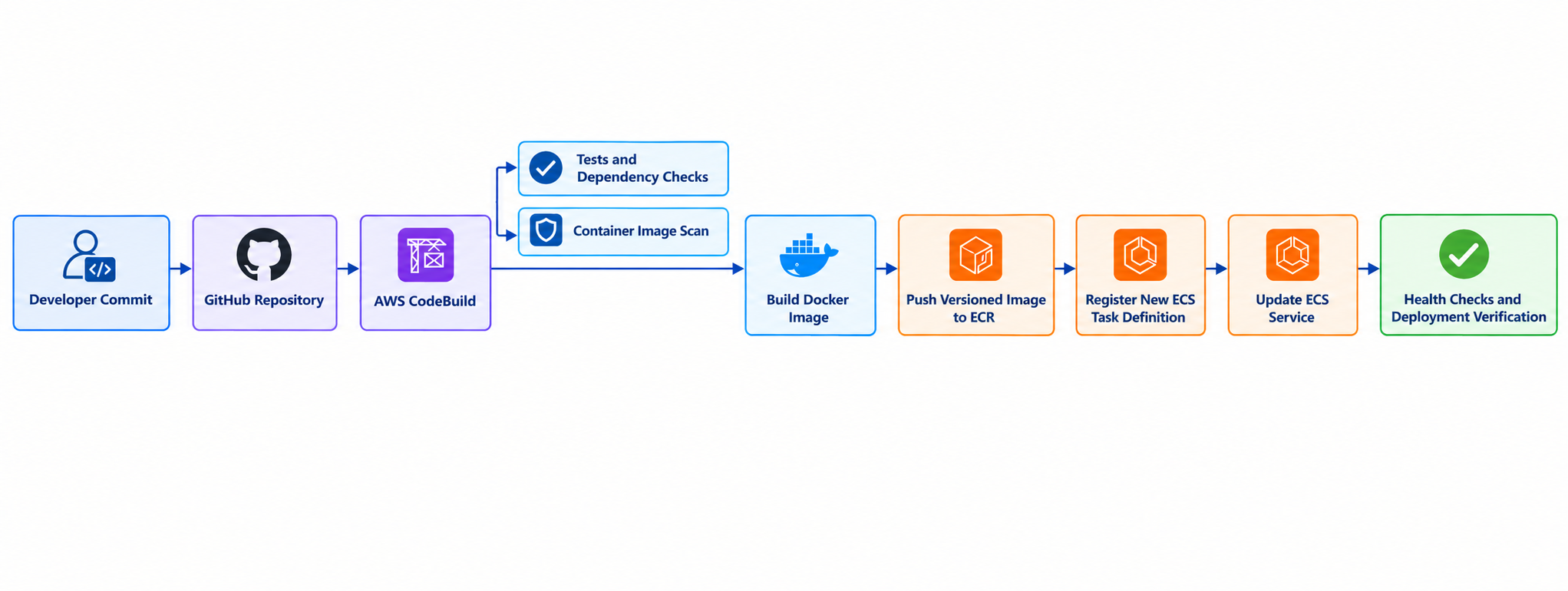
The exact deployment mechanism may use AWS CodePipeline, CodeBuild, GitHub Actions, or another deployment orchestrator.
A reliable pipeline should:
Run automated tests.
Build the image.
Scan the image and dependencies.
Push a versioned image to ECR.
Update the ECS task definition with the intended image version.
Deploy the service.
Verify service stability and health checks.
Stop or roll back a release if required conditions are not met.
Keep development and production environments separate, including IAM permissions, configuration, secrets, and deployment approvals.
Note: Do not treat a successful image push as proof that the application has been successfully deployed. Confirm that ECS tasks start, pass health checks, and process requests correctly.
16. Cost Optimization
Running ECS on EC2 requires attention to both the compute capacity and the supporting services.
Potential cost areas include:
EC2 instances.
EBS volumes and snapshots.
Application Load Balancer.
NAT gateways and data processing.
CloudWatch log ingestion and retention.
ECR image storage.
Redis or another queue service.
Database compute, storage, and backups.
Data transfer.
Amazon SES usage.
Practical optimization steps include:
Right-size EC2 instances using measured resource utilization.
Avoid excessive idle capacity while maintaining sufficient availability.
Use Auto Scaling Group limits and appropriate scale-in policies.
Set CloudWatch log retention periods.
Remove obsolete container images according to a retention policy.
Monitor NAT gateway and data-transfer costs.
Evaluate Savings Plans or other commitment-based discounts only after understanding steady-state usage.
Review whether a service is better suited to ECS on EC2 or another compute model.
Key Takeaway: Do not choose instance sizes or estimate total monthly cost based only on the number of services. Measure CPU, memory, concurrency, throughput, and high-availability requirements first.
17. ECS on EC2 vs. AWS Fargate
Amazon ECS supports multiple compute options, including EC2 and Fargate.
| Consideration | ECS on EC2 | ECS on Fargate |
|---|---|---|
| Infrastructure management | You manage EC2 capacity and hosts | AWS manages the underlying compute infrastructure |
| Compute control | More control over instance types and host configuration | Less host-level control |
| Capacity planning | Requires EC2 capacity planning | Task resources are specified without managing EC2 instances |
| Scaling | Task scaling plus EC2 capacity scaling | Task scaling without managing an EC2 Auto Scaling Group |
| Cost considerations | Depends on instance utilization and supporting costs | Depends on task resources, runtime, and supporting costs |
| Operational responsibilities | Includes host lifecycle and capacity management | Reduces host management responsibilities |
Neither option is universally cheaper or better. The choice depends on workload characteristics, operational expertise, utilization, and the level of infrastructure control required.
For HulakZen, ECS on EC2 is a reasonable option to evaluate when control over compute capacity and container placement is important. Fargate is also worth evaluating if reducing host-management overhead is a higher priority.
18. Troubleshooting Common ECS Problems
| Problem | Possible cause | What to check |
|---|---|---|
ECS task stays in PENDING | Insufficient CPU or memory, unavailable capacity, placement constraints | Cluster capacity, task requirements, capacity provider |
| Task stops shortly after starting | Application crash, invalid configuration, failed dependency | ECS stopped reason, CloudWatch logs, environment configuration |
| ECR image pull fails | IAM, network, image URI, or tag problem | Execution role, repository permissions, connectivity, image tag |
| Target is unhealthy | Incorrect port or health-check path, application not ready | Target group settings, container port, application logs |
| ECS service cannot scale out | Insufficient EC2 capacity or scaling configuration | Service scaling policies, capacity provider, Auto Scaling Group |
API returns 502 or 504 | Application failure, slow response, network or target-health issue | Load balancer metrics, target health, application latency and logs |
| Worker queue keeps growing | Too few workers, slow jobs, dependency throttling | Queue depth, job age, worker concurrency, retry behavior |
| Application cannot access AWS APIs | Incorrect task role or missing permissions | Task role ARN, IAM policy, application credentials |
| Logs are missing | Logging configuration or permissions are incorrect | Log group, execution role, region, container log configuration |
Always inspect the ECS service events and stopped-task details before changing infrastructure. They often provide the clearest explanation of a failed deployment.
19. Conclusion
Amazon ECS with EC2 offers HulakZen a way to manage containerized application services, background workers, and supporting components using AWS-native orchestration.
By separating the frontend, backend API, validation workers, and campaign processing into appropriately configured services, HulakZen can scale workloads independently and establish a more consistent deployment process.
The key is to configure both layers of capacity correctly: ECS manages application tasks, while EC2 Auto Scaling and capacity providers supply the underlying compute resources. Security, observability, reliable background processing, and controlled deployments are equally important.
This architecture provides a practical foundation to evaluate and implement as HulakZen's workload and operational requirements grow.